
Tableau, Looker, and Power BI have dominated the business intelligence market for years. And for good reason. They are mature, capable platforms with large ecosystems and broad enterprise adoption. But a growing number of data and product teams are actively looking for alternatives, and the reasons go beyond price.
This post breaks down why teams are moving away from the legacy BI stack, what to look for in an alternative, and which platforms are worth serious consideration in 2026.
Why Teams Are Looking for Alternatives
The dissatisfaction with Tableau, Looker, and Power BI tends to cluster around the same set of frustrations.
Per-seat pricing that scales against you. All three platforms charge by user. For internal analytics teams with a defined headcount that model is manageable. For ISVs and product teams trying to offer analytics to their own customers, per-seat pricing becomes a structural problem the moment your user base grows. The economics simply do not work.
Built for analysts, not for products. These tools were designed to be used by data analysts inside an organization. Embedding them into a customer-facing product is possible but typically involves significant customization, licensing complexity, and a white-labeling experience that never quite looks native.
Implementation and maintenance overhead. Tableau and Looker in particular require meaningful investment to stand up and maintain. LookML modeling, Tableau Server administration, and the ongoing work of keeping these platforms running is a non-trivial operational cost that often gets underestimated at the evaluation stage.
AI as an afterthought. Each of the major platforms has added AI features in recent years, Tableau Pulse, Looker's Gemini integration, Power BI Copilot. But in most cases these feel like layers added on top of a foundation that was not designed for AI. Natural language querying works inconsistently, and the AI capabilities rarely integrate deeply with the underlying data model.
Vendor lock-in. Looker's LookML, Tableau's proprietary data engine, and Power BI's tight coupling to the Microsoft stack all create switching costs that compound over time. Teams that built on these platforms five years ago are now maintaining infrastructure they did not fully anticipate owning.
What to Look For in a BI Alternative
Before evaluating specific tools, it helps to be clear about what problem you are actually solving.
Embedded vs. internal. If your goal is internal analytics for your own team, your requirements are different from a product team trying to give their customers a reporting experience. Embedded analytics requires white-labeling, flexible theming, row-level security scoped to end users, and a pricing model that does not penalize you for growth.
AI depth. Is the AI layer genuinely integrated into the data model, or is it a natural language wrapper sitting on top of a traditional query engine? Real AI analytics means the system can surface insights proactively, not just respond to questions.
Infrastructure fit. Where does your data live? A BI tool that requires you to move data into a proprietary engine adds latency, cost, and complexity. Tools that query your existing data warehouse or cloud storage directly are almost always preferable.
Total cost of ownership. License cost is only part of the picture. Factor in implementation time, ongoing administration, developer hours, and what happens to your bill when your user base doubles.
The Alternatives Worth Considering
Inferdat ABI™
Best For: Product teams, ISVs, and organizations of any size that want to embed analytics directly into their product or platform without per-user pricing, proprietary data engines, or months of implementation work.
Cost: $
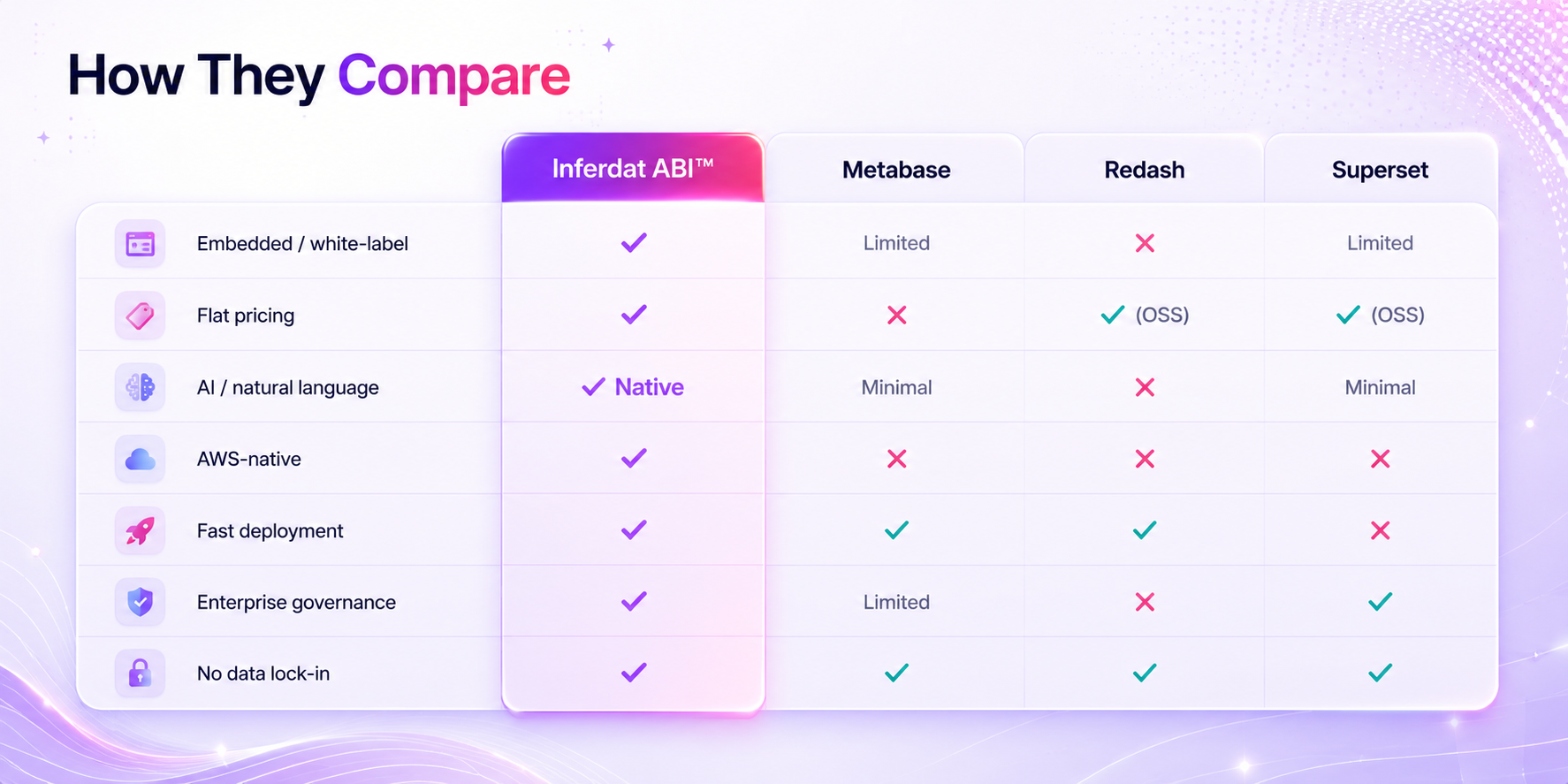
Inferdat ABI is a white-label embedded analytics and business intelligence platform built natively on AWS. It is the alternative that addresses the most common frustrations with the legacy BI stack simultaneously rather than trading one set of tradeoffs for another.
On pricing, ABI operates on flat-tier licensing with no per-user fees. Whether you are serving ten users or ten thousand, your licensing cost does not change. For any organization where the end users of analytics are customers rather than internal employees, this changes the unit economics of embedded BI entirely.
On implementation, ABI is designed to deploy in weeks rather than months. There is no proprietary modeling language to learn, no separate server infrastructure to administer, and no white-labeling process that requires an agency to make it look like your product. It runs natively on your AWS environment, which means your data never leaves your infrastructure, and it connects directly to your existing data stack without requiring a migration.
On AI, ABI is powered by Amazon Bedrock, which means natural language querying, AI-assisted insight generation, and conversational analytics are built into the core of the platform rather than added on top. Users can ask questions in plain language and get accurate, contextual answers drawn from their actual data, not a demo dataset.
On control, because ABI runs in your AWS environment, you own the infrastructure, the data, and the experience. There is no vendor data sharing, no black-box query engine, and no dependency on a SaaS platform's uptime for your customers' analytics experience.
Key Strengths:
- Flat-tier pricing with no per-user fees, purpose-built for customer-facing analytics
- AWS-native architecture with no third-party data lock-in
- Deploys in weeks, not months, with no proprietary modeling language
- Amazon Bedrock-powered AI for natural language querying and proactive insight generation
- Fully white-labeled and themeable to match your product
- Your data stays in your infrastructure, always
Metabase
Best For: Internal analytics teams at smaller organizations that need a lightweight, easy-to-use BI tool without enterprise complexity or cost.
Cost: –– –$
Metabase is one of the most popular open-source BI tools available and has earned its reputation for being genuinely easy to use. Non-technical users can build dashboards and run queries without SQL knowledge, and the open-source version is free to self-host. The cloud-hosted version is reasonably priced for small to mid-sized teams.
The limitations show up at scale and in embedded contexts. Metabase's embedding capabilities are functional but limited for sophisticated product analytics use cases, and the AI layer is relatively thin compared to newer platforms. It is a strong choice for internal analytics on a budget, less so for customer-facing embedded analytics.
Key Strengths:
- Genuinely easy to use for non-technical users
- Open-source with a free self-hosted tier
- Fast to set up for internal analytics use cases
- Active community and broad database connector support
Redash
Best For: Engineering and data teams that want a lightweight, SQL-first query and visualization tool for internal dashboards.
Cost: $
Redash is an open-source query and visualization tool that gives technical teams a fast way to connect to data sources, write SQL, and share results as dashboards. It is not a full BI platform and does not try to be. The focus is on simplicity and directness for technical users who want to get data in front of stakeholders quickly without standing up a heavyweight BI tool.
It does not have meaningful AI capabilities, white-label embedding, or the governance features that enterprise teams require. But for engineering teams that need a lightweight internal dashboard tool and have the technical capacity to self-host, it remains a useful option.
Key Strengths:
- Open-source and free to self-host
- SQL-first interface built for technical users
- Fast setup with broad data source connectivity
- Simple sharing and dashboard collaboration
Superset (Apache)
Best For: Data engineering teams with the technical resources to self-host and customize an open-source BI platform at scale.
Cost: $ (self-hosted) / $$$ (managed via vendors like Preset)
Apache Superset is a powerful open-source BI platform with a broad feature set including rich visualizations, a SQL editor, role-based access control, and support for a wide range of databases and data warehouses. It is genuinely capable at the enterprise level if your team has the engineering resources to deploy and maintain it.
The catch is that Superset's power comes with complexity. Standing it up correctly, managing upgrades, and building a reliable operational posture around a self-hosted Superset deployment requires dedicated engineering attention. Teams that underestimate this end up with a BI platform that is technically free but expensive in engineering hours. Managed Superset offerings like Preset reduce that burden at the cost of the price advantage.
Key Strengths:
- Full-featured open-source BI with enterprise-grade visualization capabilities
- Broad database and data warehouse connectivity
- Active Apache community with regular development
- Highly customizable for teams with engineering resources
The Bottom Line
Tableau, Looker, and Power BI are not going anywhere. For large enterprise analytics teams with the budget, the headcount, and the internal infrastructure to support them, they remain viable. But the category of organizations for whom those tradeoffs make sense is narrowing, not growing.
The teams building data products, embedding analytics into their applications, and trying to move fast on AWS are increasingly choosing platforms that were designed for how analytics actually gets built and deployed today. Flat pricing, AWS-native architecture, genuine AI integration, and fast time to value are not nice-to-haves. They are the baseline expectation.
That is the gap the best alternatives in this list are built to close.